
EMR Edge Node Creation Procedure
Login to AWS Console.
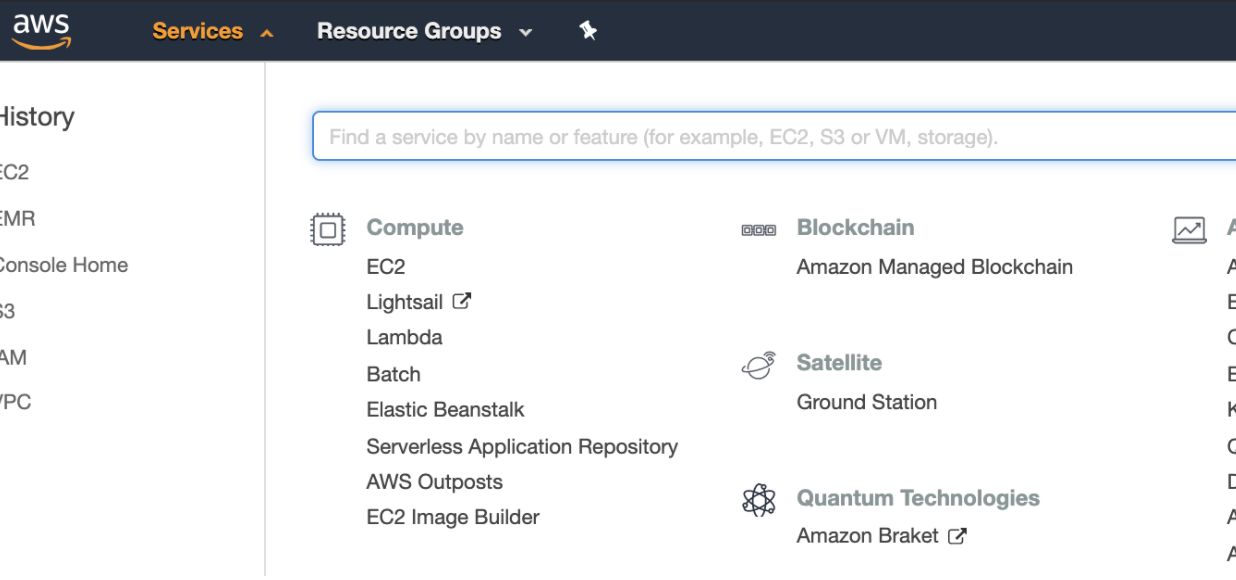
Search for EC2 in Find Services in the AWS Console dashboard.
Select the Images option from the left panel of ec2-dashboard and select AMIs.
Select Private Images in the drop-down list, search for ami-07e0233eebbcf1a6e, and click the Launch button.
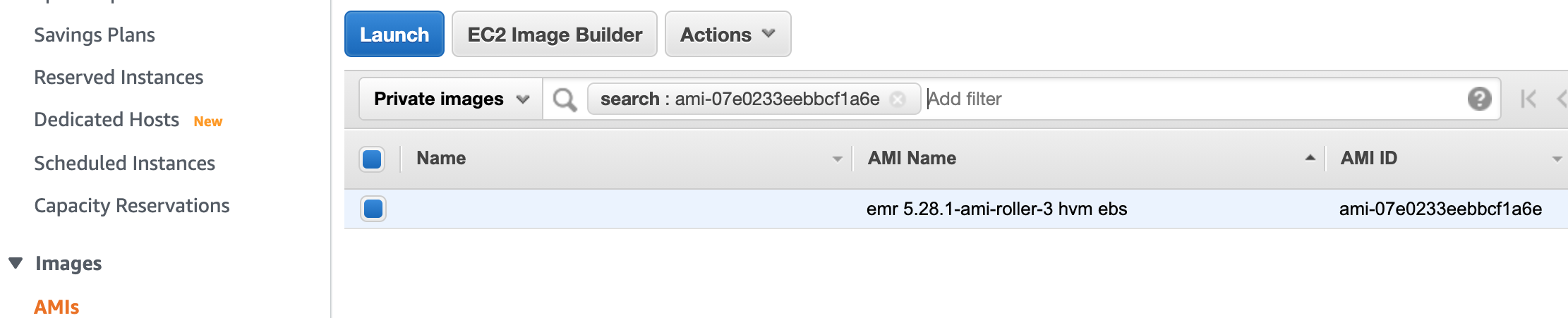
NOTE ami-07e0233eebbcf1a6e is the standard Amazon EMR 5.28.1 AMI. This AMI is available only after launching EMR cluster in the account.
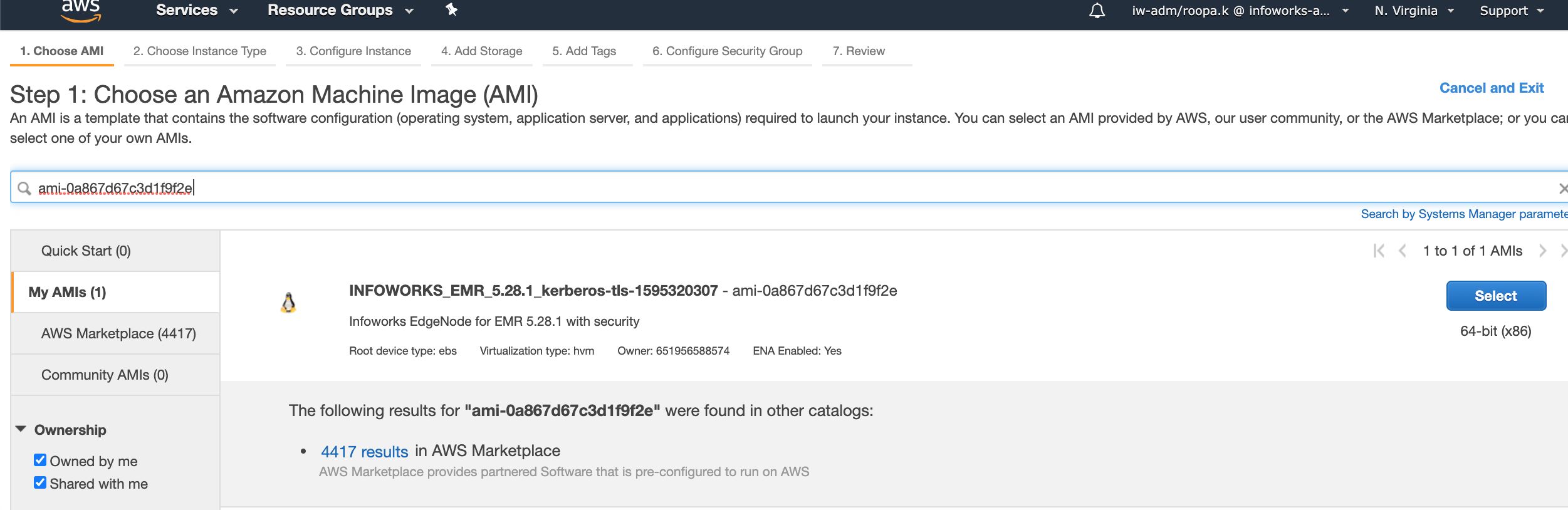
Ensure that the Shared with me checkbox for the Ownership menu is selected.
Choose the Instance configuration, and required configuration details.
Launch the Instance.
Login to the Instance
Install the following packages:
Perform the following steps:
A. Copy the site files and configurations from the Master node. To perform that, use the following commands:
NOTE: Ensure that you copy the files from the same master server, in the cluster.
sudo scp -i <<key-pair.pem>> -r ec2-user@Masterserver-ip:/etc/hadoop/conf/* /etc/hadoop/conf/
sudo scp -i <<key-pair.pem>> -r ec2-user@Masterserver-ip:/etc/hive/conf/* /etc/hive/conf/
sudo scp -i <<key-pair.pem>> -r ec2-user@Masterserver-ip:/etc/hbase/conf/* /etc/hbase/conf/
sudo scp -i <<key-pair.pem>> -r ec2-user@Masterserver-ip:/etc/spark/conf/* /etc/spark/conf/
sudo scp -i <<key-pair.pem>> -r ec2-user@Masterserver-ip:/etc/tez/conf/* /etc/tez/conf/
sudo scp -i <<key-pair.pem>> -r ec2-user@Masterserver-ip:/etc/zookeeper/conf/* /etc/zookeeper/conf/
sudo scp -i <<key-pair.pem>> -r ec2-user@Masterserver-ip:/usr/share/aws/emr/emrfs/conf/* /usr/share/aws/emr/emrfs/conf/
sudo scp -i <<key-pair.pem>> -r ec2-user@Masterserver-ip:/etc/krb5.conf /etc/krb5.conf
sudo scp -i <<key-pair.pem>> hadoop@Masterserver-ip:/var/aws/emr/userData.json /var/aws/emr/userData.json
Now, create Infoworks-user using the following command:
useradd infoworks-user
Now, set the password using the following command:
passwd infoworks-user
Now, run the following command. Ensure that you change the ownership of the userData.json file to Infoworks user.
sudo chown infoworks-user:infoworks-user /var/aws/emr/userData.json
**B.**Generate Keytabs for infoworks-user and hdfs user:
Step 1: Add Principal by running the following commands:
NOTE: Ensure that you are passing {{REALM}} and {{KPASS}} (Kerberos Password) of your cluster.
kadmin -p "kadmin/admin@{{REALM}}" -w "{{KPASS}}" -q "addprinc infoworks-user@{{REALM}}"
kadmin -p "kadmin/admin@{{REALM}}" -w "{{KPASS}}" -q "addprinc hdfs@{{REALM}}"
Step 2: Generate Keytabs by running the following commands:
kadmin -p "kadmin/admin@{{REALM}}" -w "{{KPASS}}" -q "xst -kt /etc/infoworks-user.keytab infoworks-user@{{REALM}}"
kadmin -p "kadmin/admin@{{REALM}}" -w "{{KPASS}}" -q "xst -kt /etc/hdfs.keytab hdfs@{{REALM}}"
Step 3: Change ownership of the keytabs by running the following commands:
sudo chown infoworks-user:infoworks-user /etc/infoworks-user.keytab
sudo chown hdfs:hdfs /etc/hdfs.keytab
Now, Generate TGT(Kerberos authentication ticket) for HDFS user by running the following commands:
sudo su - hdfs
kinit -k -t /etc/hdfs.keytab hdfs@{{REALM}}
C. Create infoworks-user directory on HDFS by running the following commands:
Step 1: Switch to HDFS user by running the following commands:
hdfs dfs -mkdir /user/infoworks-user
hdfs dfs -chown infoworks-user:infoworks-user /user/infoworks-user
Step 2: Create /iw directory by running the following commands:
hdfs dfs -mkdir /iw
hdfs dfs -chown infoworks-user:infoworks-user /iw
D. Now, change S3 buffer directory in the core-site.xml as:
<property>
<name>fs.s3.buffer.dir</name>
<value>/tmp/s3</value>
<final>true</final>
</property>
Now, change spark logging directory in the /etc/spark/conf/log4j.properties file as below :
spark.yarn.app.container.log.dir=/mnt/var/log/hadoop
E. Now, check the connectivity using the following command:
beeline -u “jdbc:hive2://your_hive_server_ip:10000/default;principal=hive/_ HOST@{{REALM}}”
Now, run the sample MapReduce job as infoworks-user:
Step 1: Generate KGT for infoworks-user:
kinit -kt /etc/infoworks-user.keytab infoworks-user@{{REALM}}
Step 2: Run sample MapReduce Job:
yarn jar /usr/lib/hadoop-mapreduce/hadoop-mapreduce-examples.jar pi 10 20
**F.**Copy ssl-client.xml and ssl-server.xml files from master node to edge node using the following command:
scp -i <<keypair.pem>> hadoop@<<masteripaddress>>:/etc/hadoop/conf/ssl-client.xml /etc/hadoop/conf/ssl-client.xmlscp -i <<keypair.pem>> hadoop@<<masteripaddress>>:/etc/hadoop/conf/ssl-server.xml /etc/hadoop/conf/ssl-server.xml
Now, copy JKS certificates from master node to to edge node using the following command:
scp -i <<keypair.pem>> -r hadoop@<<masteripaddress>>:/usr/share/aws/emr/security/conf /usr/share/aws/emr/security/conf
Infoworks DataFoundry Installation
NOTE: The installation logs are available at: /iw-installer/logs/installer.log
Perform the following:
Download and Extract Installer
Download the installer tar ball:
wgethttps://infoworks-setup.s3.amazonaws.com/3.1/deploy_3.1.2.tar.gzExtract the installer:
tar -xf deploy_<version_number>.tar.gzNavigate to installer directory:
cd iw-installer
Configure Installation
Run the following command:
./configure_install.sh
Enter the details for each prompt:
Hadoop distro name and installation path (If not auto-detected)
Infoworks user
Infoworks user group
Infoworks installation path
Infoworks HDFS home (path of home folder for Infoworks artifacts)
Hive schema for Infoworks sample data
IP address for accessing Infoworks UI (when in doubt use the FQDN of the Infoworks host).
Select the server details you need to provide (1 or 2).
HiveServer2 thrift server hostname
Hive user name
Hive user password
Run Installation
Install Infoworks:
./install.sh -v <version_number>
NOTE: For machines without certificate setup, --certificate-check parameter can be entered as false as described in the following syntax: ./install.sh -v <version_number> --certificate-check <true/false>. The default value is true. If you set it to false, this performs insecure request calls. This is not a recommended setup.
Post Installation
If the target machine is Kerberos enabled, performed the following post installation steps:
Go to
<IW_HOME>/conf/conf.propertiesEdit the Kerberos security settings as follows (ensure these settings are uncommented):
NOTE: Kerberos tickets are renewed before running all the Infoworks DataFoundry jobs. Infoworks DataFoundry platform supports single Kerberos principal for a Kerberized cluster. Hence, all Infoworks DataFoundry jobs work using the same Kerberos principal, which must have access to all the artifacts in Hive, Spark, and HDFS.
Copy Keystore passwords from /etc/hadoop/conf/ssl-client.xml to $IW_HOME/conf/dt_spark_defaults.conf file.
Set the password mapping as follows:
ssl.client.keystore.keypassword ⇒ spark.ssl.keyPassword
ssl.client.truststore.password ⇒ spark.ssl.trustStorePassword
ssl.client.keystore.password ⇒ spark.ssl.keyStorePassword
In the Infoworks DataFoundry landing page, navigate to Admin > Configuration > Add Configuration Entry. Add property modified_time_as_cksum to True, and save it.

If spark.dynamicAllocation.enabled is true, Replace spark.dynamicAllocation.minExecutors,spark.dynamicAllocation.initialExecutors property values from 50 to 1.
In the Infoworks DataFoundry landing page, navigate to Admin > Configuration. Change value of CSV_PARSER_LIB property from COMMONS to UNIVOCITY.

Perform sanity check by running the HDFS commands and Hive shell in the edge Node.