Azure Installation
Title
Message
Create new category
What is the title of your new category?
Edit page index title
What is the title of the page index?
Edit category
What is the new title of your category?
Edit link
What is the new title and URL of your link?
Configuring External Kerberos Server for HA EMR
Copy Markdown
Open in ChatGPT
Open in Claude
EMR with multiple master nodes requires external Kerberos.
Following is the procedure to configure the Kerberos server:
Launching EC2 Server
- Login to AWS console and navigate to EC2.
- Click the Launch Instance button.

- In the Choose an Amazon Machine Image (AMI) page, click the Select button for the Amazon Linux 2 AMI.
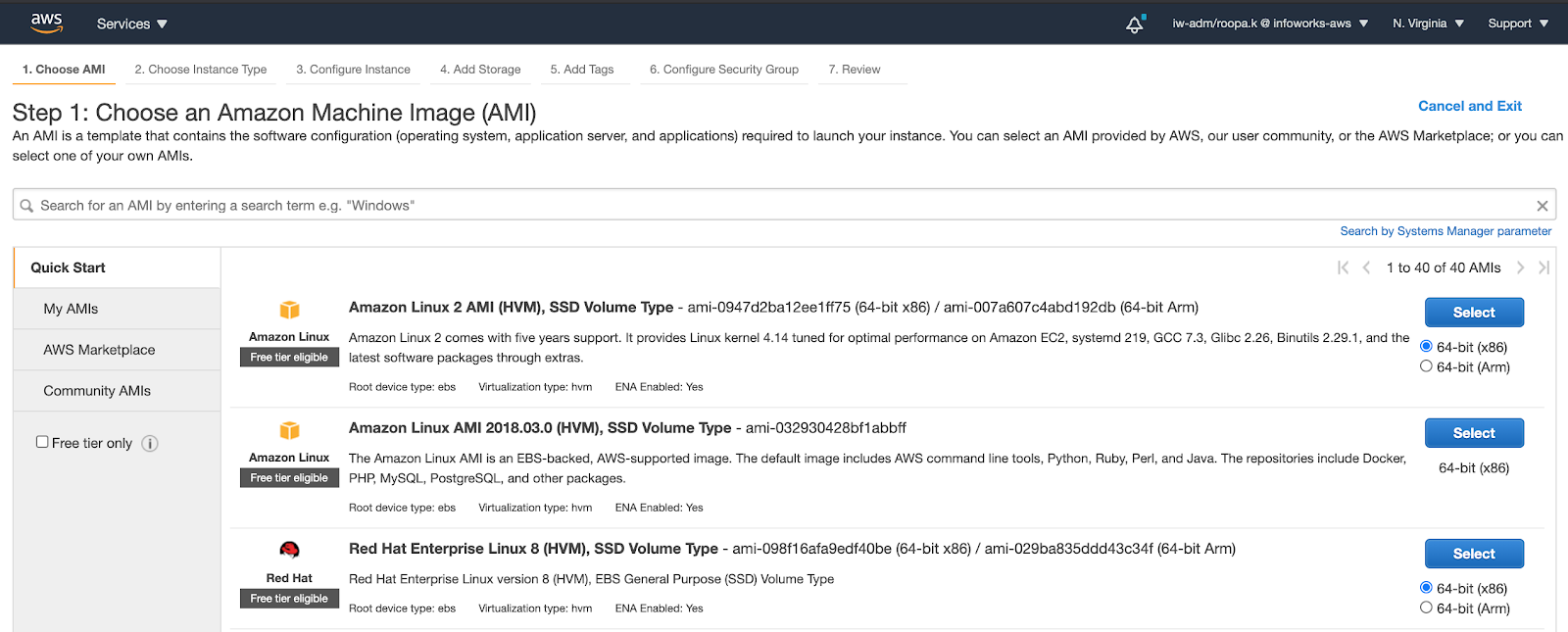
- In the next steps, select the VPC, security group, and key for authentication and launch an instance. This is the External Kerberos server.
Configuring Network and Keys to SSH
- SSH into the Kerberos server.
- Install the Kerberos server packages using the following command:
sudo yum install krb5-libs krb5-server krb5-workstation
- Define the Kerberos realm for the cluster by modifying the /etc/krb5.conf configuration file. The following is an example to configure a Kerberos server with a realm, REALM.DOMAIN (INFOWORKS.IO), on a host, ip-10-00-03-218.ec2.internal.
x
[libdefaults] default_realm = INFOWORKS.IO dns_lookup_realm = false dns_lookup_kdc = false rdns = true ticket_lifetime = 24h forwardable = true udp_preference_limit = 1000000 default_tkt_enctypes = aes256-cts-hmac-sha1-96 aes128-cts-hmac-sha1-96 des3-cbc-sha1 default_tgs_enctypes = aes256-cts-hmac-sha1-96 aes128-cts-hmac-sha1-96 des3-cbc-sha1 permitted_enctypes = aes256-cts-hmac-sha1-96 aes128-cts-hmac-sha1-96 des3-cbc-sha1[realms] INFOWORKS.IO = { kdc = ip-10.30.1.3.ec2.internal admin_server = ip-10.30.1.3.ec2.internal default_domain = ec2.internal }[domain_realm] .ec2.internal = INFOWORKS.IO ec2.internal = INFOWORKS.IO[logging] kdc = FILE:/var/log/kerberos/krb5kdc.log admin_server = FILE:/var/log/kerberos/kadmin.log default = FILE:/var/log/kerberos/krb5lib.log- Define the Kerberos realm for the cluster by modifying the /var/kerberos/krb5kdc/kdc.conf configuration file. The following is an example:
default_realm = INFOWORKS.IO[kdcdefaults] # v4_mode = nopreauth kdc_tcp_listen_backlog = 38000 kdc_ports = 0[realms] INFOWORKS.IO = { kdc_ports = 88 admin_keytab = /etc/kadm5.keytab database_name = /var/kerberos/krb5kdc/principal acl_file = /var/kerberos/krb5kdc/kadm5.acl key_stash_file = /var/kerberos/krb5kdc/stash max_life = 10h 0m 0s max_renewable_life = 7d 0h 0m 0s master_key_type = des3-hmac-sha1 supported_enctypes = aes256-cts-hmac-sha1-96:normal aes128-cts-hmac-sha1-96:normal des3-cbc-sha1:normal# supported_enctypes = des3-hmac-sha1:normal arcfour-hmac:normal des-hmac-sha1:normal des-cbc-md5:normal des-cbc-crc:normal des-cbc-crc:v4 des-cbc-crc:afs3 # default_principal_flags = -preauth }- If required, modify the /var/kerberos/krb5kdc/kadm5.acl file to grant the appropriate permissions to the admin.
- Create the KDC database using the following command:
kdb5_util create -s
- Enter the appropriate password for the KDC database master key.
- Start the Kerberos daemons using the following commands:
root@kdc-server$ /sbin/service krb5kdc start
root@kdc-server$ /sbin/service kadmin start
- To start Kerberos automatically on system restart, run the following commands:
root@kdc-server$ /sbin/chkconfig krb5kdc on
root@kdc-server$ /sbin/chkconfig kadmin on
Type to search, ESC to discard
Last updated on
Next to read:
Configuring External Hive Metastore Database for HA EMRFor more details, refer to our Knowledge Base and Best Practices!
For help, contact our support team!
(C) 2015-2022 Infoworks.io, Inc. and Confidential
Discard Changes
Do you want to discard your current changes and overwrite with the template?
Archive Synced Block
Message
Create new Template
What is this template's title?
Delete Template
Message
