
Prerequisites
EMR Version: 5.17.0
AWS Account ID of the customer to be whitelisted for accessing the Infoworks edge node.
Infoworks provides an Amazon Machine Image (AMI) of the edge node and Infoworks server software in a private marketplace library.
To obtain access to this AMI prior to proceeding with further steps, email the AWS Account ID of the account which will be used to access the Infoworks edge node image, to the Infoworks support team.
(Your Account ID will be displayed in the Amazon console My Account section.)
Infoworks support will enable access to AMI from the provided AWS Account ID. Once this is completed, you can proceed with further steps.
Procedure
Login to AWS Console.
Search for EC2 in Find Services in the AWS Console dashboard.
NOTE: Infoworks Secured AMI works only on Kerberos and In-Transit Encryption (TLS) type EMR Cluster.
Choose AMI
Select Launch Instance from the EC2 Dashboard. Select the image from My AMI Section.
NOTE: The AMI ID might be different for secured and unsecured edgenode - Unsecured: ami-06c749cc410cf9db4, Secured: ami-00bbfc93b433e4f6b.
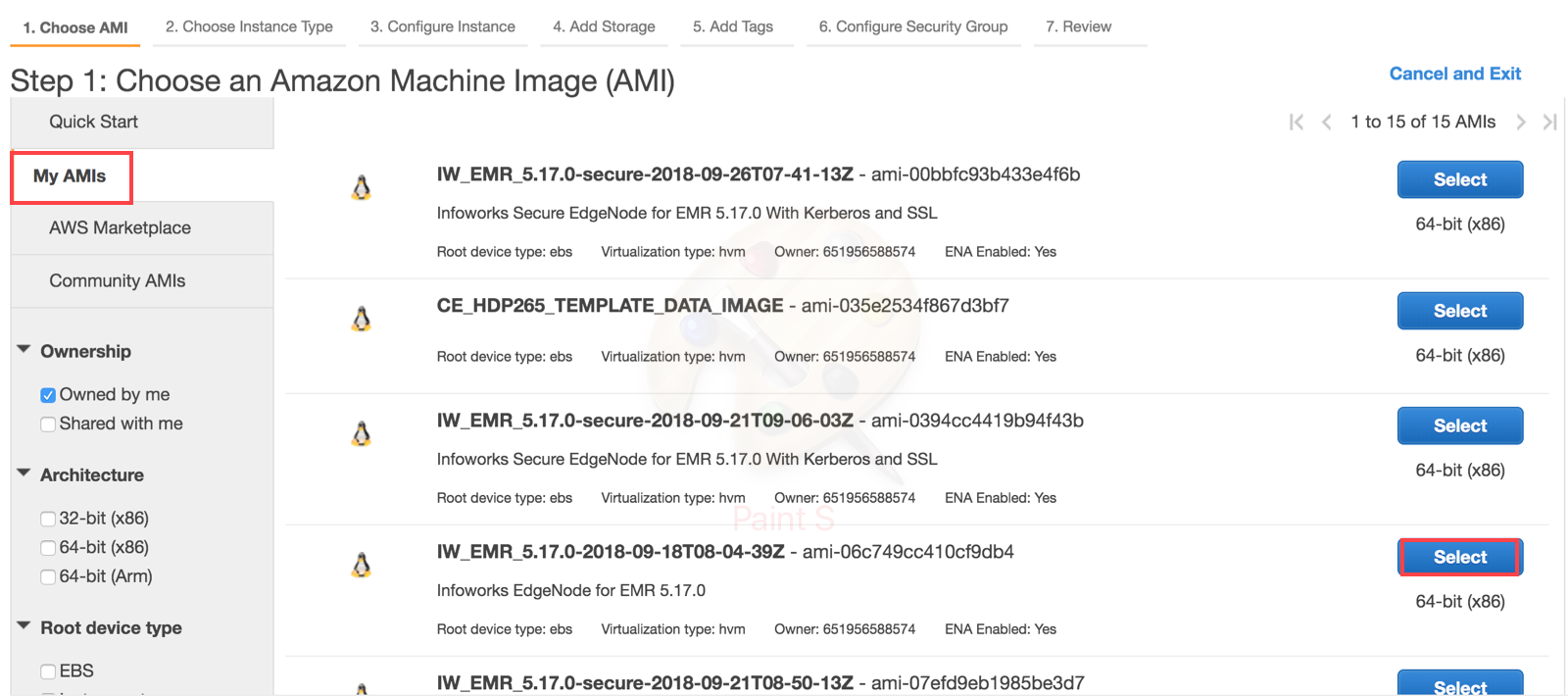
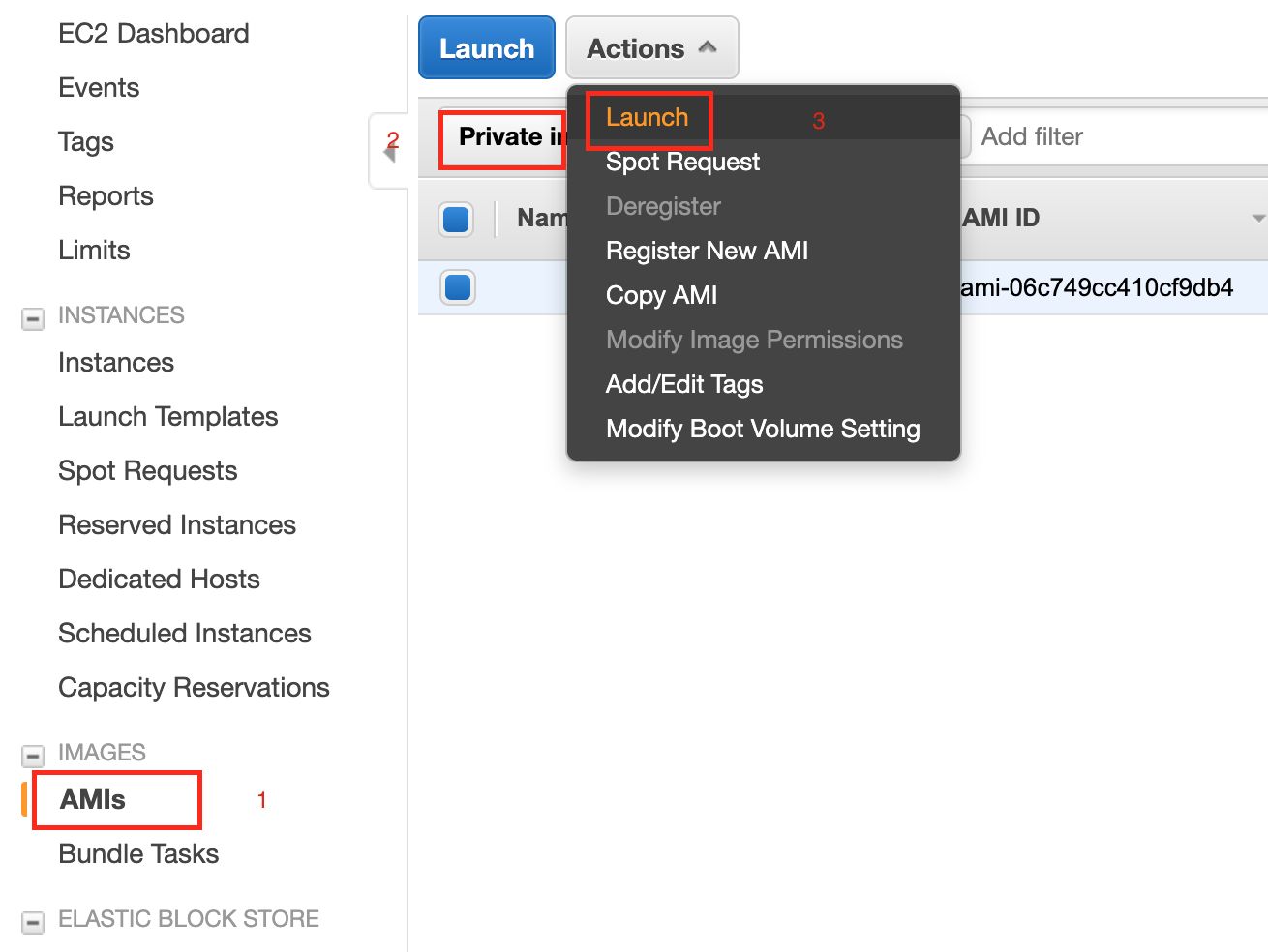
If the AMIs are not available in the above screen, following is the alternate option to launch the AMI:
Open the EC2 dashboard.
Navigate to AMIs > Private Images.
Select Infoworks EMR AMI.
NOTE: The AMI ID might be different for secured and unsecured edgenode - Unsecured: ami-06c749cc410cf9db4, Secured: ami-00bbfc93b433e4f6b.
Click the Actions option and select Launch.
Choose Instance Type
Select the machine type for the Infoworks Edgenode. Minimum and recommended is m4.4xlarge.
Configure Instance
Number of Instance is 1.
Select the VPC and Subnet ID, similar to EMR Cluster.
Add Storage
Add Root volume Storage in GB. For example, 300 GB
Add Tags
Add naming convention or environment tags for the resource.
Configure Security Group
Create a new security group and allow IW Ports and SSH.
Review
In this section review the configurations and select existing key pair or create a new key pair and proceed with creation of Instance.
SSH to EdgeNode
The default user in ec2-user.
Switch to root user using the following commands:
sudo suwget <link_to_download>bash <script>
The following inputs will be required for unsecured cluster:
Masternode private IP/DNS
Installation Procedure
The installation logs are available in <path_to_Infoworks_home>/iw-installer/logs/installer.log.
Perform the following:
Download and Extract Installer
Download the installer tar ball:
wget <link-to-download>Extract the installer:
tar -xf deploy_<version_number>.tar.gzNavigate to installer directory:
cd iw-installer
Configure Installation
Run the following command:
./configure_install.sh
Enter the details for each prompt:
Hadoop distro name and installation path (If not auto-detected)
Infoworks user
Infoworks user group
Infoworks installation path
Infoworks HDFS home (path of home folder for Infoworks artifacts)
Hive schema for Infoworks sample data
IP address for accessing Infoworks UI (when in doubt use the FQDN of the Infoworks host)
HiveServer2 thrift server hostname
Hive user name
Hive user password
Run Installation
Install Infoworks:
./install.sh -v <version_number>
NOTE: For machines without certificate setup, --certificate-check parameter can be entered as false as described in the following syntax: ./install.sh -v <version_number> --certificate-check <true/false>. The default value is true. If you set it to false, this performs insecure request calls. This is not a recommended setup.
Post Installation
If the target machine is Kerberos enabled, performed the following post installation steps:
Go to
<IW_HOME>/conf/conf.propertiesEdit the Kerberos security settings as follows (ensure these settings are uncommented):
Restart the Infoworks services.
NOTE: Kerberos tickets are renewed before running all the Infoworks DataFoundry jobs. Infoworks DataFoundry platform supports single Kerberos principal for a Kerberized cluster. Hence, all Infoworks DataFoundry jobs work using the same Kerberos principal, which must have access to all the artifacts in Hive, Spark, and HDFS.
Perform sanity check by running the HDFS commands and Hive shell in the edge Node.
For the link to download, contact the Infoworks support team.
IMPORTANT: Ensure that you add the EdgeNode Security Group ID to allow all inbound traffic to EMR Security Group.